


Banks Power
Banks Power
If you drive a vehicle equipped with Banks hardware, the Banks Power app is much more useful than a general car companion app. I found its purpose refreshingly focused: it is built to give drivers control over compatible iDash Pro and PedalMonster equipment rather than trying to become a complete navigation, maintenance, or trip-planning tool. That narrow focus is also the key to deciding whether it belongs on your phone.
Developed by Banks Power, this free Auto & Vehicles app is aimed at people who want to manage their vehicle-related hardware from a mobile screen. It is available for Everyone, works on Android devices running version 7.0 or later, and the current release is 3.4.5. The app has reached over ten thousand installs and holds a 4.3 average from 85 ratings, which suggests a reasonably positive reception without making it a universal recommendation for every driver.
I would describe it as a control companion, not a standalone automotive utility. If you do not own compatible Banks equipment, there is little reason to install it. If you do, the app can make adjustments and monitoring feel more approachable than relying on a physical interface alone. The most interesting question is not simply whether it works, but how comfortably different people can read, navigate, and use that control while dealing with the realities of driving.
How clearly the app presents vehicle controls
The first thing I value in an automotive app is a clear separation between information and action. A screen that shows vehicle data should not make it difficult to understand which controls change a setting. With the Banks app, the central appeal is the direct relationship between the phone and compatible Banks devices. That gives the experience a practical purpose: open the app when you need to inspect or manage the equipment, rather than wandering through unrelated features.
For a driver who already understands the iDash Pro or PedalMonster, this focused design can reduce mental clutter. You are not learning a large ecosystem of fuel prices, service bookings, maps, insurance tools, and community posts. The app is centered on Banks hardware, so the useful workflow is easier to imagine: connect to the relevant equipment, review what is available, and make an adjustment when the vehicle is safely parked.
Related News

Why WhatsApp Messenger Still Makes Everyday Communication Feel Easy

Jurassic World: The Game Is the Better Dino Tycoon for Strategic Players

Threads in Real Life: Who Should Join, Lurk, or Leave

How SHEIN Turned Shopping Into an Endless Content Feed

How to Make Fortnite Feel Smarter on Mobile

Should You Switch to Microsoft Outlook on Mobile?
That simplicity does not automatically make every screen accessible. Automotive controls often contain technical terms, abbreviations, and values that make sense to an experienced owner but may be intimidating to someone who has only recently started modifying a vehicle. I would not treat the app as a teaching tool for engine management. It is better suited to users who already know why they bought the hardware and what kind of response they want from it.
Readability matters especially when a phone is being used beside a vehicle. Glare, small text, a dirty screen, and bright outdoor light can all make a technically well-designed interface harder to use. My practical advice is to configure the app before leaving, while the vehicle is stationary and the screen is easy to see. That turns the phone into a preparation tool instead of something you are tempted to operate while moving.
The safest workflow is to treat the app as a parked-vehicle control panel, never as a driving distraction. Even a quick change can wait until you are stopped. This is not a criticism unique to Banks Power; it is a basic limitation of putting vehicle controls on a handheld screen. The convenience is real, but it depends on disciplined timing.
Gallery
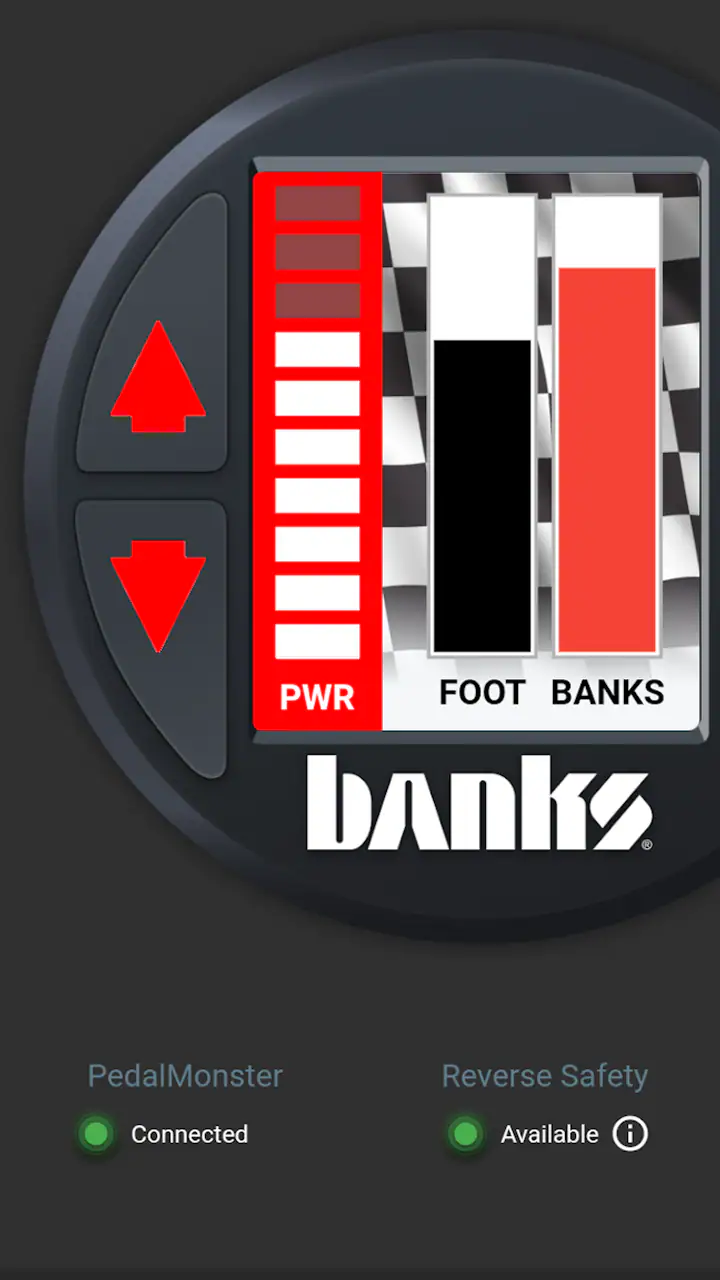
Navigation that makes sense to different experience levels
Someone familiar with Banks equipment will likely understand the app’s role quickly. A first-time owner may need a slower introduction, particularly if they are unsure whether an option affects display information, response behavior, or another part of the setup. I recommend keeping the hardware documentation nearby during the first session and changing one thing at a time. That makes it easier to connect a result with a specific adjustment.
This one-change approach is also valuable for users who find dense interfaces tiring. Instead of trying to learn every screen in one sitting, you can build a small personal routine: open the app, locate the device, check the current state, and adjust only what you understand. It reduces memory demands and makes mistakes easier to trace.
The app is less compelling for anyone who expects a broad visual dashboard with extensive explanations, guided setup, or a large library of driving information. Its strength is control over Banks hardware, not general-purpose education. A conventional vehicle app may be a better fit for reminders, route planning, fuel tracking, or service records because those tools address different needs.
Motor, visual, and sensory considerations
Using a phone to control vehicle equipment can help people who prefer touch interaction over reaching for a separate control or interpreting a physical display. The phone may already be familiar, and a user can hold it in a preferred position while parked. For drivers with limited reach, that flexibility can be meaningful, although the exact benefit depends on how the phone is mounted and how the Banks hardware is installed.
Touch interfaces also create their own challenges. Users with tremors, reduced fine-motor control, or difficulty making precise taps may find small controls frustrating. A physical control can sometimes be easier to locate by touch, while a phone requires visual confirmation. I would test the app in a stationary setting before depending on it for regular adjustments. If a setting requires repeated tapping or careful selection, it may not be comfortable for every user.
Visual fatigue is another realistic concern. A phone screen can be easier to enlarge or reposition than a fixed display, but that does not guarantee comfortable reading. People with low vision should check whether the device’s own text-size and display settings make the app usable. I would also avoid relying on the phone in direct sunlight until you know the screen remains legible in your vehicle and environment.
For users who are sensitive to visual motion, rapid changes, or crowded information, a focused automotive app may feel calmer than a general dashboard packed with maps and notifications. On the other hand, technical controls can still be mentally demanding because the consequences of a change may not be obvious immediately. The interface may be easy to open while the decision about what to change remains the difficult part.
Hearing-related needs are worth considering too. I would not choose this app on the assumption that sound will guide every important action. A user who cannot depend on audio cues should plan to confirm changes visually and use the app only when the vehicle is stopped. That is a sensible habit for everyone, but it is particularly important when a user needs clear visual confirmation rather than an audible prompt.
Reducing cognitive load during setup
One of the most useful habits I found is to create a repeatable setup routine rather than treating every session as an experiment. Before driving, check that the phone is charged, open the app while parked, connect to the intended Banks equipment, and confirm the setting you actually want. If another person helps with the vehicle, agree on simple words for the preferred configuration so you do not have to explain technical details in a hurry.
Users who process information more slowly may benefit from writing down their preferred arrangement before making changes. That is especially helpful when switching between work, towing, commuting, or other driving contexts. The app can provide control, but a personal reference note can provide the memory support that an automotive interface may not include.
I also recommend avoiding adjustments immediately after installing or updating the app. Spend a quiet session learning where the controls are and confirming that the connected hardware responds as expected. This is not about distrust; it is about separating learning time from the pressure of getting on the road.
Using it in everyday driving situations
A realistic example would be a driver who uses a vehicle during the week and occasionally needs a different response from the accelerator. Before leaving for work, the driver can use the app while parked to check the compatible Banks setup and prepare the desired configuration. Later, before a different type of trip, they can repeat the process without trying to operate the phone in traffic. That is where the app’s value becomes practical: it supports preparation between journeys.
Another use case is a shared vehicle. One driver may prefer a less aggressive pedal response, while another may want a different feel. The app can make the adjustment process more convenient for the person who understands the Banks equipment, but shared use also introduces a communication problem. Everyone who drives the vehicle should know that a setting may have been changed and should agree on a safe way to verify it before moving off.
For a vehicle owner who is testing how the setup feels under different conditions, the app can support a more methodical approach. Change a single setting while parked, drive in an appropriate and legal environment, and make notes about the result. Do not make several changes at once and then try to guess which one caused a difference. That simple discipline turns the app from a novelty into a useful part of vehicle tuning and observation.
Situational access also includes poor connectivity, gloves, cold weather, and low attention. A driver wearing thick gloves may struggle with a touchscreen, while someone dealing with rain or glare may not want to interact with a phone at all. These are reasons to prepare settings in advance, not reasons to use the phone while driving. If you regularly operate the vehicle in conditions where a touchscreen is difficult, a dedicated physical control may be more convenient for the specific task.
The app is not a replacement for safe vehicle operation or professional mechanical judgment. It gives access to compatible Banks equipment, but it cannot make an unsuitable adjustment appropriate for every load, road, or driver. I would be particularly cautious when letting a less experienced driver use a vehicle with changed settings. Familiarity with phones does not equal familiarity with vehicle behavior.
Where the experience may still create barriers
The largest barrier is compatibility with the Banks hardware itself. This is not a general-purpose app that becomes useful simply because it is installed. Its reason for existing is tied to iDash Pro and PedalMonster equipment, so people without those products should skip it rather than expecting useful vehicle diagnostics or maintenance features.
There is also a knowledge barrier. The app may help control equipment, but it does not remove the need to understand what that equipment does. A new vehicle owner could mistake an available option for a recommendation. I would prefer to see every user approach it as an interface for an existing setup, not as an invitation to make unexplained changes.
Phone dependence is another trade-off. A smartphone can be easier to update and carry than a dedicated controller, but it also brings distractions, battery concerns, notifications, and a screen that may be unavailable at the exact moment you want it. If you want a control method that is always mounted and immediately identifiable, the usual dedicated hardware approach may suit you better.
The app may also be the wrong choice for drivers who want accessibility to be handled automatically. People who need large, high-contrast controls, extensive voice guidance, switch access, or a very simple interface should test it carefully on their own device before committing to a workflow. Android’s accessibility tools may improve the experience, but I would not assume that every screen or control will respond perfectly to every system setting.
In comparison with ordinary Auto & Vehicles apps, Banks Power is narrower but potentially deeper for its intended audience. A navigation app wins for directions, a service app wins for maintenance reminders, and a generic vehicle dashboard may offer broader compatibility. Banks Power wins only when the priority is interacting with compatible Banks equipment. That specialization is a strength for owners and a complete mismatch for everyone else.
My inclusive verdict for Banks owners
After looking at the app through the lens of different abilities and driving contexts, I see a useful but specialized tool. It can make compatible iDash Pro and PedalMonster equipment easier to manage from a familiar device, and its focused purpose avoids the clutter found in many all-in-one automotive apps. The free price also removes a financial hurdle for someone who already owns the necessary Banks hardware.
At the same time, the app does not eliminate the physical, visual, cognitive, or situational demands of vehicle control. Small touch targets, glare, technical terminology, phone handling, and the need to remain parked during adjustments all matter. The most inclusive way to use it is to plan ahead, make one change at a time, confirm the result visually, and avoid treating the phone as something to operate while the vehicle is moving.
I would recommend it to Banks equipment owners who want mobile control and are comfortable learning the meaning of their settings. It is especially sensible for people who prefer preparing a vehicle before a trip, sharing configuration responsibilities with another driver, or keeping a consistent adjustment routine. I would skip it if you do not have compatible Banks products, need a broad vehicle-management app, or strongly prefer physical controls over a touchscreen.
With an average rating of 4.3 across 85 ratings, it appears to satisfy many of the people who find it relevant. My own recommendation is more specific: install it when your Banks hardware is the reason you need an app, and judge it by how safely and comfortably it fits your parked-vehicle routine. For that audience, it is a practical companion rather than a flashy extra. For everyone else, a different automotive app—or no app at all—will make more sense.
FAQs for Banks Power
What is Banks Power, and what does the app do?
Banks Power is associated with Banks Power automotive products and performance information, particularly for diesel trucks, engines, and related upgrades. Depending on the version or platform you access, it may provide product details, vehicle compatibility information, installation resources, news, and ways to explore Banks engineering solutions. It is primarily useful for enthusiasts and owners researching performance, efficiency, and engine monitoring products.
Is Banks Power compatible with my vehicle?
Compatibility depends on your vehicle’s make, model, engine, model year, and the specific Banks Power product you want to use. Before downloading or purchasing anything, check the official product listing and application guide carefully. Diesel trucks and performance systems can differ significantly even within the same model range, so do not assume that a product designed for one engine or year will work with another.
Does Banks Power require additional hardware or paid products?
The app or digital resources may be useful for researching Banks products, but many of the features and solutions discussed are connected to separately purchased hardware, such as tuners, monitors, intake systems, exhaust components, or other engine upgrades. Some information may be available at no cost, while physical products, accessories, installation services, and advanced functions can require payment. Review the product description and pricing before committing.
Can beginners use Banks Power products safely?
Beginners can use Banks Power resources to learn about performance upgrades, but installing or tuning automotive hardware should not be treated as a simple plug-and-play task in every case. Incorrect installation or unsuitable settings may affect engine reliability, emissions compliance, warranty coverage, or vehicle safety. If you are unfamiliar with diesel systems, consult the official instructions and consider having installation completed by a qualified technician.
Is Banks Power suitable for vehicles used on public roads?
Whether a Banks Power product is legal for public-road use depends on the exact product, vehicle, location, and applicable emissions regulations. Some performance modifications may be intended for specific applications, while others may have restrictions or require certification. Before purchasing or installing anything, verify local laws, emissions requirements, and warranty implications. The app’s information should support your research, but it should not replace official regulatory guidance.
Pros
- Real-time engine data helps monitor performance while driving.
- Customizable gauges make key vehicle information easy to read.
- Supports Banks sensors and compatible performance hardware.
- Trip logging helps compare driving behavior and vehicle performance.
- Clean interface is practical for daily use and diagnostics.
Cons
- Many features require compatible Banks hardware to work fully.
- May be less useful for drivers without a modified diesel vehicle.
- Vehicle data accuracy depends on sensor installation and connection.
- Some advanced options may require additional purchases.
- Can increase battery usage during extended monitoring sessions.


